
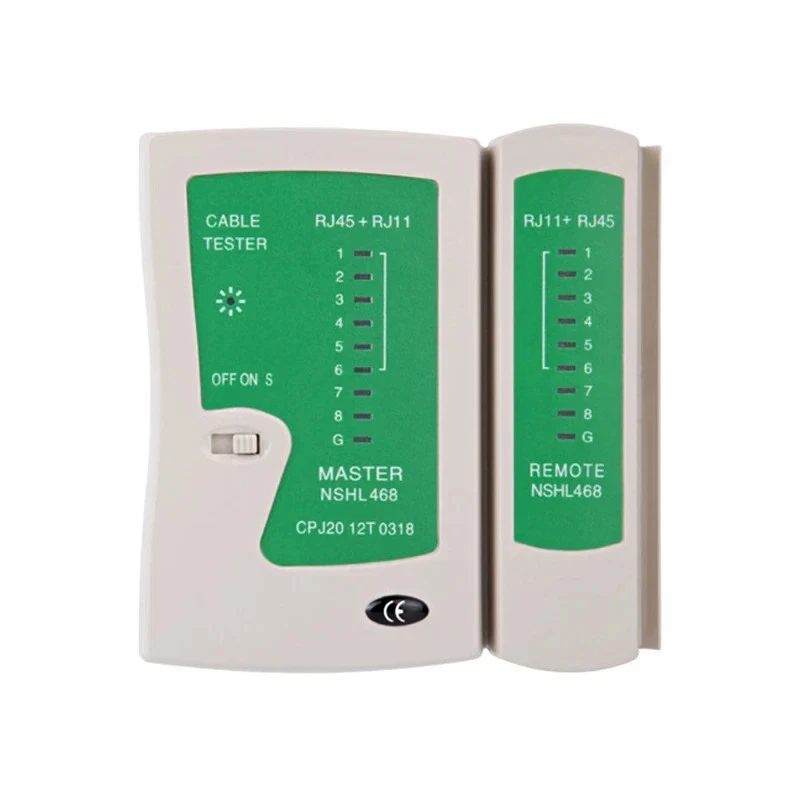
How to record the test: all numbered lights should match between the Main Tester and Remote. Select each light that illuminates. For RJ45 use 1–8; for RJ11 use 1–6. If a number is missing on either side, the result will identify that failed conductor.
Main Tester
Remote
Tester reference: Master and Remote have indicators 1–8 + G. The switch provides OFF / ON quick test / S slow test.
Test reference
RJ45: positions 1–8RJ11: positions 1–6G: shield/ground where present
A normal cable should illuminate the same numbered positions on the Main Tester and Remote. RJ45 expects 1–8; RJ11 expects 1–6. Missing numbers identify conductors with no continuity. This page records continuity; it does not certify Cat5/Cat6 bandwidth or performance.
A normal cable should illuminate the same numbered positions on the Main Tester and Remote. RJ45 expects 1–8; RJ11 expects 1–6. Missing numbers identify conductors with no continuity. This page records continuity; it does not certify Cat5/Cat6 bandwidth or performance.
Inventory
Saved on the NAS and shared across your devices. Export a CSV for backup or send a text summary by email/WhatsApp.
| Asset | Label | Type | Status | Wiring / Fault | Length | Location | Date | Actions |
|---|